Feature-Rich Remote Access Software for Businesses
RealVNC is intended to provide businesses and employees with the ability to remotely access files within a secure framework. As the package itself is noticeably scalable, it can represent the preferred solution for enterprise-level organizations which are looking for a feature-laden system to proactively manage day-to-day tasks. This remote access software can save a business time, money and confusion.
One of the primary benefits associated with RealVNC is the fact that the learning curve for employees is dramatically reduced thanks to thorough documentation and an intuitive user interface. Robust encryption algorithms and advanced firewalls are able to thwart most security threats, an obvious concern when dealing with remote connections. The global reach of this virtual architecture is also suited for international businesses or users who regularly travel to foreign countries. Multiple stakeholders can be provided with access while management will still maintain centralized control over information as well as the available functions.
Additional Tools and Options
RealVNC provides higher uptime rates and thanks to a more transparent CMS framework, the overall ROI of an enterprise-level firm will be enhanced. A free version is available for home use. Up to five computers and three users can be supported. Professional platforms will require a contractual purchase.
Pros
The home-based version is free of charge and can be downloaded immediately
Robust encryption software ensures more reliable security solutions
Cons
The professional package only supports a single computer
All billing cycles are subject to a yearly (as opposed to a monthly) contract
Securely access and control your Windows devices from anywhere
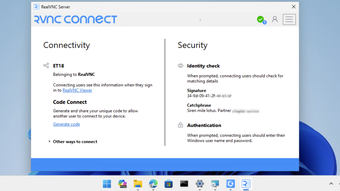
Access and control your Windows computers from anywhere with RealVNC Server. Installed on the devices you want to reach, RealVNC Server works with RealVNC Viewer to provide secure, reliable remote access whether you're supporting colleagues, managing business systems, or connecting to your home PC while away.
Designed for both individual users and IT professionals, RealVNC Connect makes remote access simple by eliminating the need for complex network configuration. Connect across local networks or the internet and stay productive wherever you are.
Key features
Secure remote access without complex setupRealVNC Connect automatically establishes secure connections between devices, helping you avoid the hassle of configuring firewalls, setting up port forwarding, or managing VPNs. Or choose to use manually configured direct (via LAN) connections with RealVNC Server.
End-to-end encrypted sessionsBuilt-in encryption protects your remote sessions and data while in transit, helping keep sensitive information secure when accessing devices across external networks.
Multi-factor authentication (MFA)Strengthen security with an additional layer of identity verification, helping ensure only authorised users can access remote systems.
File transfer, remote printing, and audio supportWork effectively from anywhere by transferring files between devices, printing documents to local printers, and accessing remote audio during support or collaboration sessions.
Cross-network connectivityConnect to Windows devices securely whether they're located in the office, at home, or on the other side of the world.
Why choose RealVNC Connect?
RealVNC Connect combines enterprise-grade security with an easy-to-use remote access experience. Unlike traditional remote desktop solutions that often depend on VPNs or complex networking configurations, RealVNC Connect provides a secure and dependable way to access devices across LANs and the internet.
Trusted by businesses, IT teams, managed service providers, public sector organisations, and home users worldwide, RealVNC Connect delivers the security, reliability, and control needed for modern remote access.
Laws concerning the use of this software vary from country to country. We do not encourage or condone the use of this program if it is in violation of these laws. Softonic may receive a referral fee if you click or buy any of the products featured here.